此篇文章受密碼保護,請輸入密碼後閱讀。
- 4月 02 週日 201700:35
僅依靠“神奇公式”選股 其中的風險是什麼?
- 8月 20 週六 201607:12
A man who retired at 34 shares a spreadsheet that helped him get there
 Brandon, also known as the Mad Fientist.Courtesy of Mad Fientist.
On August 1, 2016, Brandon officially retired.
The 34-year-old software developer and blogger behind the Mad Fientist — who doesn't use his last name online for privacy reasons — had been planning and saving for years to retire early.
"For the first five to seven years of my career, I wasn't saving for anything in particular," Brandon told Business Insider. "I was just saving because I wanted a portfolio. Then I learned about financial independence, and I was like, 'This is perfect. This is what I'm saving for.'"
Brandon, who is married but keeps his finances largely separate from his wife, Jill, an optometrist who isn't interested in retiring, was talking about the concept of financial independence as pursued and documented by an online community of bloggers and readers seeking to save enough that they can stop working and "retire."
Living frugally and working in rural Vermont, he managed to save and invest about 70% of his after-tax income, and saved enough to leave his job in spring 2014. However, when he approached his employer with the news he'd be moving to Scotland to be closer to his wife's family, the employer offered to make his position remote.
That change eliminated all of the things that frustrated Brandon most about working life, like commuting, dealing with difficult coworkers, and navigating endless meetings. So he stayed on for a few years more than planned, intermittently traveling with Jill until they relocated full time to Scotland in May 2015. There, he continued working, blogging, and saving until he retired this summer.
"It's always been about 'financial independence' for me and not really 'early retirement,'" he told Business Insider. "I never wanted to stop working, but rather I wanted to have the time and freedom to work on things that are important to me.
"It's a very powerful position to be in, to be able to do things without worrying about the monetary reward, so I imagine I'll be more productive and make a far greater impact on the world now that I don't have to trade my time for money and don't have money driving my decision-making."
On Mad Fientist, Brandon offers a free, downloadable Excel spreadsheet to help others calculate when they can afford to retire. It's not the exact one he uses — since he built this version in 2014, he's made some tweaks to his own — but lays out the most important factors, accounts, and balances he's been tracking for years.
Bear in mind that the numbers in the sheet are not his actual numbers, which he does not share. These numbers are for example purposes only.
The blue cells are the ones people can edit (on the interactive version from the website — below are screenshots that don't accept data) to input their numbers.
He walked Business Insider through the spreadsheet:
View As: One Page Slides
- 5月 19 週四 201616:29
絕對用得到!6個Excel小訣竅讓報表更專業,還有14個超棒快速鍵
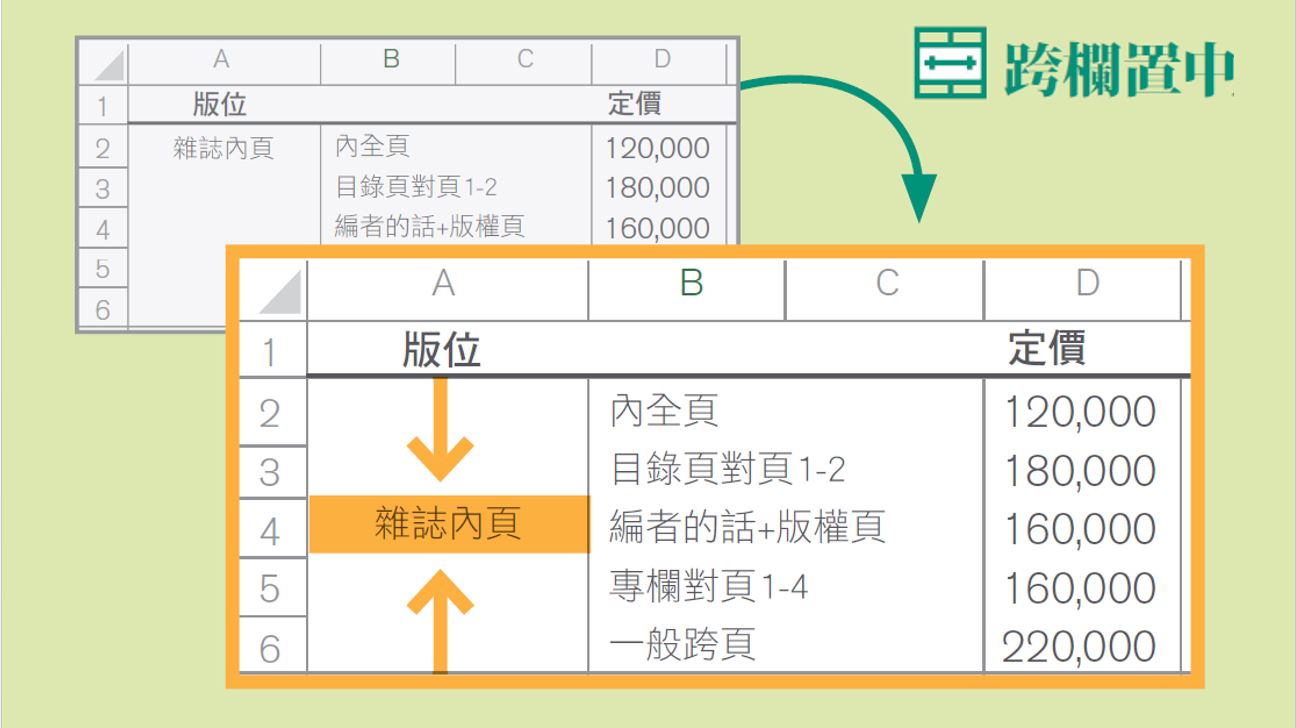
想讓老闆另眼相看,只有速度還不夠!最標準的報表,是資料整整齊齊排列,讓老闆可以一眼看出「重點在哪裡」。這時候,你需要這6個美化報表的技巧:
1. 跨欄置中:幫表格內容群組化,橫跨儲存格設定分類
跨欄置中能讓你跳出儲存格的限制來整理資料內容。像是這張雜誌刊登價格表,就可以選擇A2到A6的儲存格,再點選「常用」索引標籤裡、「對齊方式」的「跨欄置中」,讓「雜誌內頁」的分類置於第2列到第6列中間,讓人一眼看清楚這些內容是同一個群組。
- 3月 01 週二 201600:12
全球領先的Python演算法交易平台─Quantopian
此篇文章受密碼保護,請輸入密碼後閱讀。
- 1月 12 週二 201617:55
絕對用得到!6個Excel小訣竅讓報表更專業,還有14個超棒快速鍵
此篇文章受密碼保護,請輸入密碼後閱讀。
- 8月 27 週四 201523:15
【台北】巧用Excel VBA 提升您的資訊力(16)

上課講師
tivo168 學歷 經歷Excel財務分析應用教學部落格版主、獵豹財務長部落格人氣共同作家 專長 著作獵豹財務長投資藏寶圖 上課日期2015-10-24 上課時間9:00 - 16:30 課程時數6 上課地點巨匠電腦台北認證 -台北市中正區公園路30號3樓 307教室 課程費用NT 8,888 好友折扣8.5折 NT 7,555
- 4月 03 週五 201518:55
【EXCEL學習】EXCEL最佳學習方法 (引用ExcelHome網站文章)
如 果你是EXCEL新手,建議你花一、二十分鍾把下文好好看幾遍,如果你是老手你更應該花時間讀一讀,去了解怎麼樣才能成為EXCEL專家。在薪水不漲的年 代裡,投資理財已是必備技能,你放心將自己的錢交給別人來管理嗎?想要自己來,EXCEL是絕對要學習的工具軟體,花時間在學習EXCEL上絕對值 得,Microsoft 在1990年發行 Offcie 3.0 以來就有EXCEL,在2007年Office 2003以後變動就不大,熟悉基本函數與VBA可輕易解決工作或投資理財上的難題。
引用 ExcelHome 網站的精華帖 http://club.excelhome.net/thread-272002-1-1.html
《底下內容也是之前推薦書【聰明工作必知 EXCEL 函數與公式實戰精粹】一書中P.2 到P.7導論,最佳EXCEL學習方法》
引用 ExcelHome 網站的精華帖 http://club.excelhome.net/thread-272002-1-1.html
《底下內容也是之前推薦書【聰明工作必知 EXCEL 函數與公式實戰精粹】一書中P.2 到P.7導論,最佳EXCEL學習方法》
1

 Trend趨勢 (6)